
The fastest reliable way to extract key points from a transcript is a four-step AI-assisted workflow: clean the raw text, run AI extraction for topics and action items, verify owners and numbers by hand, then format the output for your audience. Skip the cleanup or verification step and you’ll ship a summary with confident, wrong information in it. Do all four, and a 60-minute meeting becomes a five-minute read in under ten minutes of your time.
TL;DR:
- AI summarization requires a four-step process: cleaning the transcript, extracting topics and action items, verifying critical details, and formatting for the audience.
- Including clear decisions, action items with owners and deadlines, and timestamped quotes is essential for creating a trustworthy, useful summary.
- Accurate speaker attribution and timestamp linkage are crucial, especially for assigning tasks and verifying quotes or decisions.
- Manual verification should focus on owner names, numeric facts, and deadlines to catch AI errors efficiently.
- Using high-quality, timestamped transcripts and proper export formats ensures the reliability and verifiability of the AI-generated summary.
Table of Contents
- What Should a Transcript Summary Actually Include?
- How Does AI Transcript Summarization Actually Work?
- A Step-by-Step Workflow to Extract Key Points From Any Transcript
- Templates You Can Reuse for Every Transcript Summary
- How Do You Choose the Right Tool for the Job?
- What Can Go Wrong, and How Do You Catch It?
- Turning Raw Transcripts Into Reliable Summaries at Scale
- The Real Trade-Off Nobody Tells You About AI Summaries
- Sources
- FAQ
What Should a Transcript Summary Actually Include?
A summary that’s missing pieces is worse than no summary at all, because it gives readers false confidence that they know what happened. Before you extract key points from a transcript, know what “done” looks like.
A complete transcript summary includes:
- An overview sentence stating what the meeting or video was about and why it happened
- Three to six key takeaways covering the substance, not just topics mentioned in passing
- Decisions made, each tied to the person or group who made the call
- Action items with an owner and, ideally, a deadline attached to each one
- Notable quotes, timestamped so anyone can jump back to the original moment
- Optional Q&A and resource links when the source material includes a discussion or references documents
Each piece serves a different reader. An executive skimming for five seconds needs the overview sentence and takeaways. A project manager needs the action items with owners, because an action item without a name attached rarely gets done. A journalist or content marketer needs the quotes with timestamps, since a quote you can’t verify against the recording is a liability, not an asset. Leave any of these out and you’ve built a summary for nobody in particular.
How Does AI Transcript Summarization Actually Work?
AI summarization tools run several distinct processes in sequence, and knowing what each one does helps you judge whether the output is trustworthy or needs a second look.
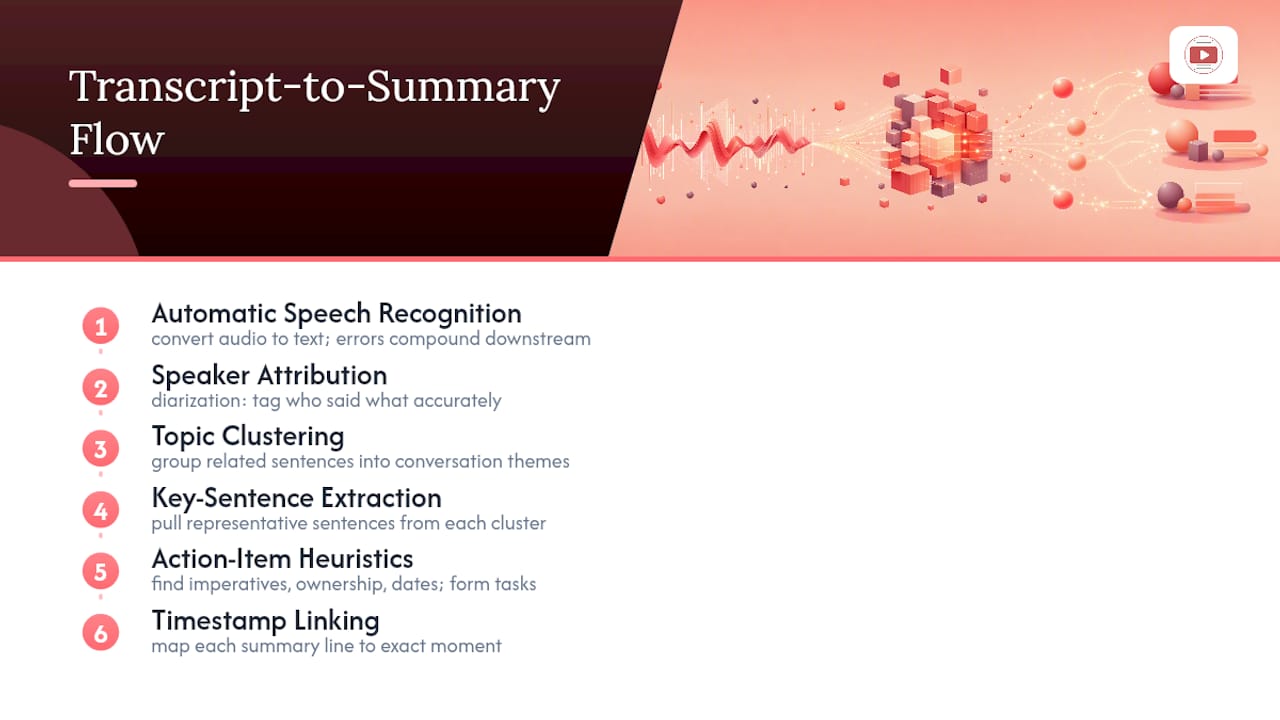
It starts with automatic speech recognition (ASR), which converts audio into text. ASR quality depends heavily on audio clarity, cross-talk, and accents, and a noisy recording produces a transcript full of small errors that compound downstream. A transcript riddled with mistranscribed words gives every later step worse raw material to work with, so cleanup before extraction matters more than most people assume.
Next comes speaker attribution, sometimes called diarization, which tags who said what. This step is not optional if you care about action items: an AI can only assign a task to “Sarah” if it correctly separated Sarah’s voice from everyone else’s in the first place. Weak diarization is the single most common reason action-item lists come out wrong.
After that, the system runs topic clustering, grouping related sentences into themes even when the conversation jumps around, and extracts key sentences from each cluster. Some tools then apply action-item heuristics: they scan for imperative verbs (“send,” “follow up,” “finalize”), ownership phrases (“I’ll handle,” “can you take”), and date references, then package those into a task with an assignee and a due date when one was actually stated.
Timestamps run through all of it. Good tools map every summary line back to the exact moment in the recording, which is what makes it possible to check a quote or a decision without re-listening to the whole thing. Many transcript-summary services now build this timestamp linking into the product by default, and it’s the feature that separates a summary you can trust from one you have to take on faith.
A Step-by-Step Workflow to Extract Key Points From Any Transcript
This is the exact sequence to follow whether you’re summarizing a client call, a board meeting, or a two-hour panel discussion.
- Get the best transcript you can. If you’re working from a recording, use capture settings that preserve speaker separation and export in a format that keeps timestamps, like SRT or VTT. If your source is a YouTube video, pull the transcript directly rather than retyping it by ear.
- Clean the transcript. Strip filler words, fix misheard proper nouns and names, and normalize timestamp formatting. A clean-up workflow built around a few reusable AI prompts turns this from a tedious manual chore into a two-minute pass.
- Run AI extraction. Feed the cleaned transcript into your summarization tool and pull topics, key takeaways, notable quotes, and candidate action items.
- Do one human verification pass. Focus only on owners, deadlines, and any numeric fact or claim the AI generated. This single pass catches the majority of AI errors without requiring a full reread.
- Format the output for your audience. An executive gets a short overview and bullets. A project team gets an action-item list. A content team gets quotes and highlights.
- Archive with metadata. Save the summary alongside the date, participant list, and a link back to the source recording so anyone can re-verify a line six months later.
Pro Tip: Read the action items out loud before sending the summary. If a sentence doesn’t clearly name who’s doing what by when, the AI probably inferred an owner it shouldn’t have. Fix it or cut it.
Given that more than a third of business meetings are considered unproductive, a workflow that turns even a mediocre meeting into a clear, actionable record pays for the time it costs almost every time.
Templates You Can Reuse for Every Transcript Summary
Copy these structures directly and fill in the blanks. They map to the same five components covered earlier, so you’re never starting from a blank page.
Executive overview. One paragraph, three to four sentences: what the meeting covered, the single biggest decision or outcome, and what happens next. Skip adjectives. State the fact.
Key takeaways. A tight bullet list, capped at six items:
- Takeaway one, stated as a complete claim, not a topic label
- Takeaway two, with a number or specific detail if one exists
- Takeaway three, tied to a decision or a risk
Action-item table. This is the format that gets copied into Slack and PM tools most often, so keep the fields minimal.
Q&A log. List each question, the answer given, and a timestamp if the exchange matters enough to reference later. Include this section only when the source material actually had a discussion segment.
Repurposing brief. A short note translating the summary into content: which quote works as a social post, which takeaway becomes a newsletter line, which decision needs a follow-up blog post. This is the step most teams skip, and it’s the one that turns a one-time summary into ongoing content value, an approach templates for training and meeting notes consistently recommend.
How Do You Choose the Right Tool for the Job?
Not every transcript needs the same tool, and picking the wrong category wastes more time than it saves.
ASR-first tools focus purely on converting audio to text accurately. Use these when your transcript quality is the bottleneck, typically for noisy recordings or heavy accents. End-to-end summarizers take a transcript and produce the full package, takeaways, quotes, action items, in one pass. These fit best when you run the same type of meeting repeatedly and want consistent output. Workflow and integration tools sit on top of either category and push results directly into Slack, Notion, or a project tracker, which matters most for teams generating summaries daily. New entrants in this category, including AI meeting assistants that now embed summaries directly into email and scheduling workflows, illustrate how fast this space is moving toward full integration.
Before committing to a tool, check it against this list:
- Does it label speakers accurately, or does every line read as one voice?
- Are timestamps preserved and clickable back to the source?
- Does it flag action items automatically, or only produce a generic summary?
- Can you export to the format your team actually uses (Markdown, Notion, TXT, SRT)?
- Does it offer access controls or retention settings appropriate for sensitive recordings?
Volume and sensitivity should drive the decision more than feature lists. A five-person team running occasional calls needs less automation than a firm processing dozens of client sessions weekly, and a legal or HR recording demands far tighter security controls than an internal brainstorm.
What Can Go Wrong, and How Do You Catch It?
AI transcript summarization fails in predictable ways. Misattributed speakers lead to action items assigned to the wrong person. Dropped items happen when someone mentions a task quickly and moves on before the model registers it as one. Numeric facts, dollar figures, dates, percentages, get paraphrased into something close but not identical to what was said, and quotes drift from the original wording just enough to matter in a public-facing context.
Run this verification checklist before anything goes out the door:
- Confirm every action-item owner against who actually spoke in that segment
- Check every quoted line against its timestamp in the source recording
- Validate every number, date, and dollar figure the summary states as fact
- Flag any legal, financial, or compliance-related claim for a full human rewrite rather than a spot check
On the privacy side, treat transcripts like any other sensitive document: restrict access to people who need it, set a retention window instead of storing everything indefinitely, redact names or details when a summary will be shared outside the original group, and confirm participants consented to recording in the first place. The NIST AI Risk Management Framework offers a useful operational baseline here: treat AI output as a draft requiring verification, not a finished product, especially for anything reliability-critical.
Pro Tip: Reserve full human rewrites for anything leaving the building, press statements, legal filings, public recaps. Internal summaries can tolerate a light verification pass; external ones can’t tolerate any unverified claim at all.
Turning Raw Transcripts Into Reliable Summaries at Scale
Cleaning a messy transcript by hand used to eat more time than the meeting itself. A documented set of cleanup prompts changes that math, letting you strip filler and fix misheard names in one pass before extraction even starts using the AI Search Prompt Tracker. Combined with export formats built for reuse, TXT for quick reference, SRT or VTT for anything timestamp-dependent, the same cleaned transcript can feed an executive summary, an action-item table, and a repurposing brief without redoing the source work three times.
Translation support matters too, particularly for teams running calls across languages, since a summary is only useful if the people who need to act on it can actually read it. Every summary line should trace back to a timestamp in the original recording. If you can’t click from a takeaway to the moment it was said, you can’t verify it, and a summary you can’t verify isn’t a summary you can trust with anything important.
The Real Trade-Off Nobody Tells You About AI Summaries
AI extraction gets you 90% of the way there in a fraction of the time a manual pass would take, and for most internal meetings, that’s genuinely enough. The trade-off shows up in the last 10%: numbers, names, and anything you’d regret getting wrong in public.
From a 60-minute meeting, I’d keep every action item with a clear owner and cut any takeaway that reads as a topic label rather than a real claim. The trick that speeds verification most: check the three or four numbers first, dollar figures, dates, percentages, before reading anything else. Numbers are where AI drift does the most damage, and they’re the fastest thing to confirm against a timestamp.
— Vitaly Prius
Sources
- NIST AI Risk Management Framework guidance
- More than a third of business meetings are unproductive due to a lack of generational diversity
- Training session notes template (Key takeaways, Q&A + Summary) | GoTranscript
FAQ
Is there a free tool that can summarize a transcript?
Yes. Several AI summarization tools offer free tiers that generate bullet-point summaries from a pasted transcript, though most cap length or usage and reserve action-item detection and export formats for paid plans.
Can ChatGPT transcribe meeting notes?
ChatGPT cannot transcribe audio directly, but once you have a text transcript, you can paste it in and ask for a structured summary with takeaways and action items; accuracy still depends on how clean the transcript was to begin with.
How do you get a summary from a PDF transcript?
Extract the text from the PDF first, either by copying it directly or running it through an OCR tool if it’s scanned, then feed that text into an AI summarizer the same way you would a plain transcript file.
How do you get an AI summary of any text?
Paste the text into a summarization tool or an AI assistant and ask for specific outputs, key takeaways, action items, notable quotes, rather than a generic summary, since specifying the format upfront produces far more usable results.
What’s the biggest risk of trusting an AI summary without checking it?
Misattributed action items and paraphrased numbers are the most common errors, which is why a short human verification pass focused on owners, deadlines, and figures is worth the extra few minutes every time.