
The fastest reliable way to automate a YouTube transcript workflow is a five-step pipeline: trigger, transcript fetch (native captions or a service like TranscriptAPI), fallback audio transcription for videos with no captions, LLM processing, then storage or export. You can launch this today with an importable n8n workflow for batch runs, or use a browser extension like Youtubetotranscript for one-off video capture. Expect near-instant turnaround on captioned videos and a few extra minutes when the fallback kicks in.
TL;DR:
- Using native captions via API works only if captions are enabled and may silently fail otherwise, limiting reliability for videos without captions.
- Transcript API services provide consistent JSON transcripts suitable for automation but rely on API credentials and may incur costs on failed attempts.
- Fallback audio transcription is slower and more expensive but essential for videos lacking captions, with batching and error handling critical for scalability.
- The most effective pipeline combines multiple methods, emphasizes error routing and chunking, and starts with testing on short videos before scaling.
- Manual tools like Youtubetotranscript offer quick, one-off transcripts with language translation and cloud storage, ideal for immediate needs without infrastructure.
Table of Contents
- Four Ways to Automate Your YouTube Transcript Extraction
- Build the Pipeline: Trigger, Fetch, Fallback, Store
- Turning Raw Transcripts Into Usable Content
- Keeping High-Volume Runs From Falling Over
- Where Youtubetotranscript Fits Into an Automated Pipeline
- Launch Your First Automated Run in Under an Hour
- What Actually Matters Once You Start Building This
- Get a Working Transcript in Seconds, Not a Pipeline
- Sources
- FAQ
Four Ways to Automate Your YouTube Transcript Extraction
Your acquisition method decides everything downstream, from cost to reliability. Here’s how the four main approaches stack up.
- Native YouTube captions via API. This is the fastest and often free route. It works when the uploader has captions enabled, whether auto-generated or manually added, but it fails silently on videos where captions are disabled entirely.
- API-first transcript services. Endpoints like TranscriptAPI return structured transcript arrays with timestamps and metadata through a simple HTTP GET call. This approach is more stable for automation because it hands you consistent JSON instead of scraping a caption track yourself.
- Direct audio transcription as fallback. When no captions exist, a webhook or callback-based transcription service processes the raw audio. It’s slower and costs more, but it catches the videos your primary method misses.
- Browser-extension capture. A tool like Youtubetotranscript handles quick, single-video extraction with immediate export, no pipeline required. It’s the right call when you need one transcript right now, not a hundred overnight.
Most working systems combine two of these: an API-first fetch for scale, with a fallback for the gaps.
Build the Pipeline: Trigger, Fetch, Fallback, Store
A production-ready transcript pipeline follows a predictable node structure, and the pattern documented in n8n’s own transcript automation guide breaks down into five stages you can build or import directly.
- Trigger node. Use a Schedule node for recurring channel monitoring, a Webhook for on-demand requests, or a new row in Google Sheets to queue specific video URLs.
- YouTube metadata fetch. Pull the title, duration, and video ID before touching the transcript, since you’ll need these fields for storage and downstream prompts.
- Transcript fetch via HTTP Request. Call your TranscriptAPI-style endpoint with the video ID. This is also where ready-made n8n templates plug in directly.
- IF node with continue-on-fail. Route non-200 responses to an audio-transcription fallback like AssemblyAI instead of letting the run die.
- LLM and storage nodes. Send the transcript text to your processing node, then write results to Sheets, Airtable, or cloud storage.
For authentication, YouTube’s own metadata calls need OAuth with the correct read-only scope, while TranscriptAPI-style services typically use Header Auth with an API key stored in your automation host’s credential vault, never hardcoded in the node. For long videos, split the transcript into chunks before generating anything, and carry timestamp data through each chunk so your final SRT, TXT, or VTT export lines up correctly. Practical GitHub examples show working chunking and Airtable field-mapping code you can adapt directly.
Pro Tip: Test your pipeline on one short video with clean captions first. Get the node chain working end to end before you point it at a batch of fifty uploads, because debugging one failed run is a lot faster than debugging fifty.
Turning Raw Transcripts Into Usable Content
Getting the transcript is the easy part. The actual payoff comes from what you build on top of it, and n8n’s guidance on transcript automation makes the same point: transcription is the starting line, not the finish.
Chunk long transcripts with a modest overlap, roughly 10 to 15 percent, between segments so the LLM doesn’t lose context at chunk boundaries. Feed each chunk through with a prompt that demands a fixed output shape, such as JSON with keys for summary, key_points, and timestamp_reference, rather than free-form prose you’ll have to parse by hand later.
From one transcript, you can generate several assets in parallel:
- An executive summary for quick skimming
- Timestamped show notes mapped back to the original video
- An SEO title and meta description draft
- RAG-ready chunks formatted for vector database ingestion
One n8n template built around Google Sheets runs exactly this pattern, firing multiple AI nodes off a single transcript and writing each output to its own destination column. If you’re prepping content for a RAG pipeline, strip timestamps from the ingestion copy but keep a separate timestamped version for human reference. You want clean prose in the vector store and clean references in the doc your team actually reads.
Keeping High-Volume Runs From Falling Over
The gap between a transcript workflow that works once and one that works at scale is almost entirely about error handling. Missing captions are the most common failure, and your IF node should treat any non-200 response from your transcript endpoint as a signal to route to an audio-transcription fallback rather than a signal to stop.

Cost management matters here too. Many TranscriptAPI-style services charge credits only on a successful return, so a failed lookup on an uncaptioned video costs you nothing beyond the wasted API call itself. That makes aggressive fallback attempts cheap insurance rather than a budget risk.
For batching, avoid dumping five hundred video IDs into one execution. Chunked processing through Item Lists keeps memory pressure manageable and prevents automation hosts from timing out mid-run.
- Set retry with exponential backoff on any HTTP node hitting an external transcript or audio service
- Cap batch size per execution and queue the remainder for the next run
- Pre-check audio quality where possible; low bitrate or heavy background noise increases fallback transcription errors
Pro Tip: Log every failed video ID to its own row in Sheets or Airtable with a status flag. Re-running fifteen flagged failures takes two minutes; re-running the whole batch takes an hour.
Where Youtubetotranscript Fits Into an Automated Pipeline
Not every job needs a full n8n pipeline running in the background. Youtubetotranscript covers the other half of the workflow: the moments you need one transcript, right now, without spinning up infrastructure.
The Chrome extension gives you one-click extraction directly from a YouTube video page, with export to TXT, SRT, or VTT depending on what your downstream tool expects. It handles videos without native captions using AI-based transcription, supports translation across 89 or more languages, and stores completed transcripts in the cloud so you’re not re-running the same video twice.
- One-click transcript extraction, including videos with no captions available
- Export in TXT, SRT, or VTT
- Multi-language translation support
- Cloud storage for repeat access
- Batch processing for handling multiple videos in one pass
For automated pipelines, the same underlying transcription capability that powers the extension can sit downstream of a trigger built in n8n, feeding your metadata fetch step the way a TranscriptAPI call would. Youtubetotranscript’s translation coverage across 89-plus languages is a meaningfully wider net than most single-purpose transcript APIs offer, which matters if your channel monitoring spans non-English content.
Launch Your First Automated Run in Under an Hour
You don’t need a week of setup to get a working pipeline. Here’s the fastest path from zero to a tested run.
- Pick your acquisition method: native captions for speed, an API-first service for consistency, or a browser extension for one-off jobs, and confirm you have working credentials for it.
- Import an existing n8n template or build the five-node structure yourself: trigger, metadata fetch, transcript fetch, fallback IF node, storage.
- Run the workflow against a single, short, captioned video first to confirm the chain executes cleanly end to end.
- Check the output file and formatting, then add retry/backoff and an error-logging row before your first real batch.
- Once one video works, scale to a small batch of five to ten and watch for timeout or memory issues before going wider.
- Set up basic monitoring, an alert on repeated failures or a webhook that pings you when a batch completes, so you’re not manually checking a dashboard.
What Actually Matters Once You Start Building This
Most advice on transcript automation obsesses over the acquisition step, as if getting the text out of YouTube is the hard part. It isn’t. Native caption pulls and API calls are commodity operations at this point, and any competent workflow will get you clean text most of the time. The real work, and the real value, sits in what happens after the transcript lands: the chunking discipline, the prompt structure that forces JSON instead of prose, and the error routing that keeps one bad video from stalling a batch of two hundred.
The other place conventional wisdom oversells itself is scale. Plenty of guides assume you’re processing hundreds of videos a day and need enterprise infrastructure from day one. Most solo creators and small teams don’t. A browser extension handling one video at a time and a lightweight n8n pipeline handling scheduled batches can coexist, and honestly should. Build the automated pipeline for recurring channel monitoring, keep a fast manual tool on hand for the one-off video someone sends you at 4 PM on a Friday. Prioritize error handling before you scale volume. A pipeline that fails loudly and recovers gracefully beats one that’s fast but silent when it breaks.
— Vitaly Prius
Get a Working Transcript in Seconds, Not a Pipeline
Not every transcript job needs a webhook, an OAuth scope, and a retry policy. If you just need one video’s text right now, running it through a five-node automation pipeline is overkill. Youtubetotranscript exists for that exact gap: open the extension, click once, and get a formatted transcript back without touching an API key or a credential vault.
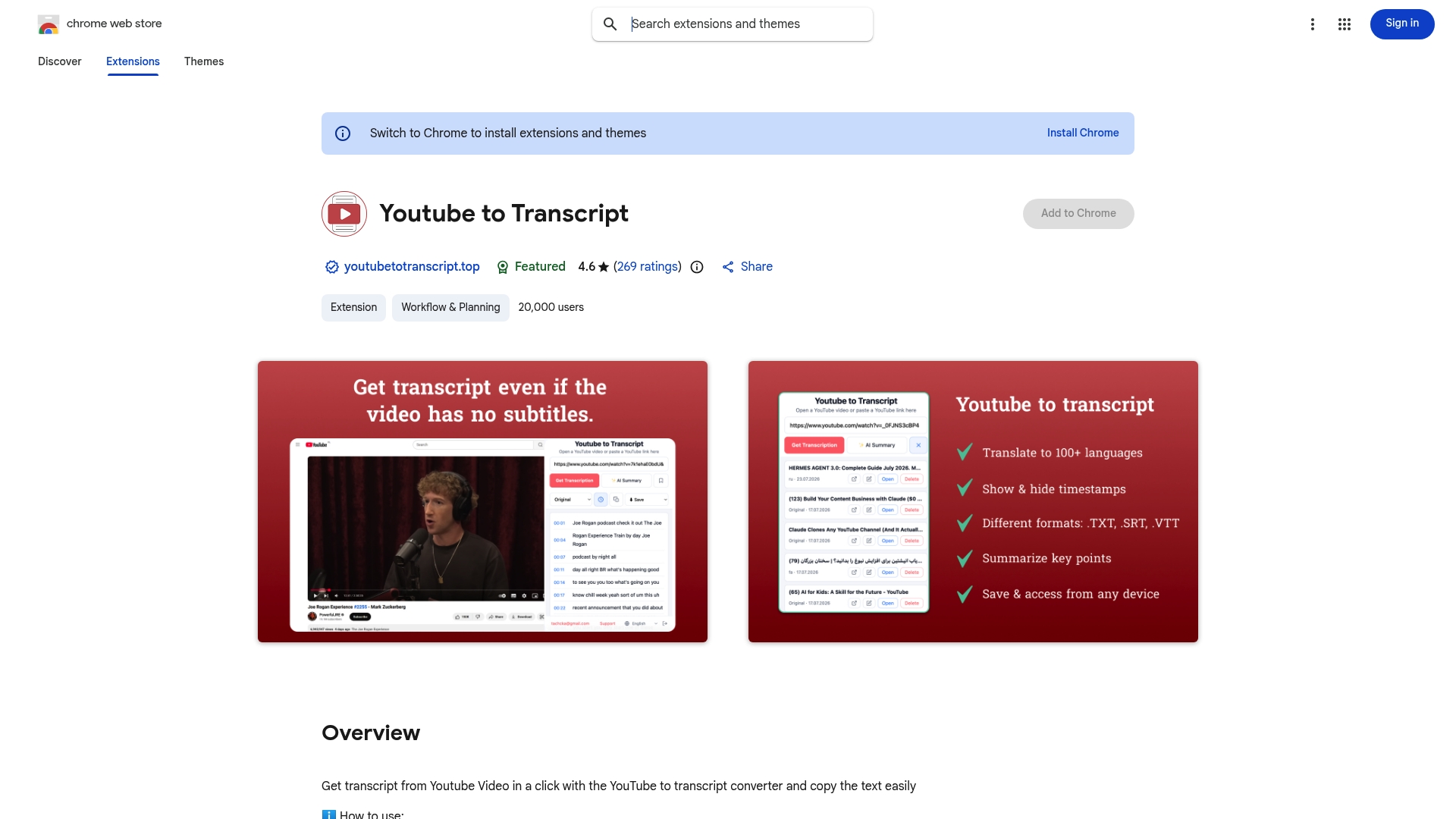
It also covers the cases an n8n pipeline can’t handle cleanly on its own, videos with no captions at all, content in languages you need translated into English, or a transcript you want stored in the cloud for reference next month instead of buried in a Sheets row. Export straight to TXT, SRT, or VTT depending on what you’re feeding it into next. If you’re building the automated side of your workflow and need a fast, reliable way to handle the manual overflow, install the Youtube to Transcript extension and try it on your next video.
Sources
FAQ
How can I automatically transcribe YouTube videos?
Use a trigger, such as a schedule or webhook, connected to a transcript fetch step like TranscriptAPI, with a fallback to audio transcription for videos without captions. For single videos, a browser extension like Youtubetotranscript gets you a transcript in one click without building a pipeline.
Is YouTube automation still worth it in 2026?
Automating the transcript and content-derivative side of a YouTube workflow remains worth it because the ROI comes from turning one transcript into multiple assets, summaries, show notes, SEO drafts, in one automated pass rather than manual rework.
What is the 7 second rule on YouTube?
This refers to the idea that viewers decide whether to keep watching within the first several seconds of a video, a retention concept tied to hooks and pacing rather than to transcript or captioning workflows.
Can ChatGPT transcribe a YouTube video?
ChatGPT cannot directly access or transcribe YouTube audio on its own. You need a transcript source first, such as native captions, a transcript API, or a tool like Youtubetotranscript, and then you can feed that text to an LLM for summarization or analysis.