
AI transcription typically costs $0.003 to $0.25 per audio minute, while human transcription runs $1.00 to $3.00 per audio minute. That gap is the whole story behind youtube transcription cost decisions.
- AI transcription: $0.003 to $0.25 per minute, depending on the plan
- Human transcription: $1.00 to $3.00 per minute, higher for legal or medical audio
- Best fit for AI: high-volume creators, clean audio, internal notes or drafts
- Best fit for human: published captions, courtroom or medical accuracy, tricky audio
For most creators publishing regularly, an automated tool like Youtubetotranscript covers the job at a fraction of what a human transcriptionist charges, especially when you just need searchable text or a quick export.
Key Takeaways
AI transcription costs a fraction of a cent to a few cents per minute, while human transcription costs $1.00 to $3.00 per minute, making volume and accuracy needs the deciding factors.
| Point | Details |
|---|---|
| AI vs. human baseline | AI runs $0.003–$0.25 per minute; human runs $1.00–$3.00 per minute for standard work. |
| Subscriptions reward volume | Bundled minute plans lower per-minute cost once monthly usage climbs past occasional use. |
| Hidden fees add up | Rush turnaround, speaker labeling, timestamps, and caption conversion often bill separately from the base rate. |
| Test before you commit | Run the same clip through AI, edited AI, and human transcription to compare cost against actual accuracy. |
| Youtubetotranscript fits frequent creators | The browser extension offers one-click extraction, TXT/SRT/VTT export, and 89+ language translation at a fraction of human per-minute rates. |
Table of Contents
- What Drives Youtube Transcription Cost: The Main Pricing Models
- Typical Cost Ranges: AI vs. Human Transcription Per Minute
- What Affects Price: Audio, Turnaround, and Formatting
- Worked Examples: What You’ll Actually Pay
- How to Choose the Right Transcription Option for Your Budget
- When Youtubetotranscript Is the Practical, Cost-Effective Choice
- Breakdown of Additional Costs: Editing, Timestamps, and Captions
- Comparing Features Across Transcription Services
- Getting Started With the Youtubetotranscript Browser Extension
- Sources
- FAQ
What Drives Youtube Transcription Cost: The Main Pricing Models
Every transcription vendor prices its service one of five ways, and knowing which model you’re looking at prevents sticker shock later.
- Free tier: YouTube’s auto-generated captions cost nothing but often mangle names, jargon, and accents. Many transcription tools also offer a free trial capped at a few minutes.
- Subscription plans: You pay a flat monthly fee for a bundle of minutes. These pay off once your volume climbs, since subscription plans often lower per-minute cost for high-volume users compared with one-off orders.
- Credit or token models: You buy a block of credits that convert to minutes at a fixed rate. Always check the conversion rate before buying. A “1,000 credit” pack sounds generous until you learn it only covers 20 minutes of audio.
- Pay-as-you-go (PAYG): You’re billed per minute with no commitment. AI PAYG plans stay cheap; human PAYG plans add up fast, and many carry a minimum order (often 15 to 30 minutes) even for a 3-minute clip.
- Add-on fees: Rush turnaround, speaker labeling, and caption file formatting often sit outside the base rate.
Typical Cost Ranges: AI vs. Human Transcription Per Minute
The per-minute number only means something once you attach it to real audio length, so here’s how the math actually plays out.
- AI transcription: $0.003 to $0.25 per minute. Subscription tiers land at the low end; pay-as-you-go plans without a monthly commitment sit closer to $0.25. Rev prices its AI transcripts at $0.25 per audio minute, a useful benchmark for the PAYG ceiling.
- Human transcription: $1.00 to $3.00 per minute for standard work, climbing toward $2.00 to $5.00 for rush jobs or specialist subject matter. Rev’s human transcripts list at $1.99 per minute, and freelance marketplace discussion pegs a common going rate near $1.00 per media minute for less formal work.
Plug those numbers into real video lengths and the gap turns from abstract to concrete. A 10-minute clip costs roughly $0.03 to $2.50 with AI, versus $10 to $30 with a human transcriptionist. A 60-minute video runs about $0.18 to $15 with AI, versus $60 to $180 human. Five hours of monthly video, a realistic load for a weekly podcast, costs from less than a dollar up to several tens of dollars on AI tools, compared to a few hundred dollars for human transcription at standard rates.
What Affects Price: Audio, Turnaround, and Formatting
Two vendors quoting wildly different rates for the same video usually aren’t comparing the same service. A handful of variables explain most of the spread.
- Audio quality and speaker count: Overlapping voices, background noise, and heavy accents push AI accuracy down and often force a human pass, which industry pricing guides consistently flag as a cost driver.
- Turnaround time: Same-day or rush orders commonly carry a per-minute premium on top of standard rates, sometimes doubling the base price.
- Formatting requirements: Verbatim transcripts, timestamps, and speaker labels all add editing time, which shows up as a line-item fee on human orders.
- Language and translation: Non-English audio or multi-language export requests typically cost more, particularly with human vendors who need bilingual staff.
- Unused minutes: Subscription plans that go unused each month are wasted spend, and overage charges on plans you exceed can wipe out the savings entirely.
Pro Tip: Before committing to a subscription, calculate your average monthly minutes over the last three months of content. Guessing high locks you into a bigger plan than you need.
Worked Examples: What You’ll Actually Pay
Numbers land better with a real scenario attached, so here are three common creator situations.
- A social short (3 to 10 minutes): Free AI tools or a low subscription tier handle this for $0.01 to $2.50 total. There’s rarely a reason to pay for human transcription at this length unless the clip needs published, word-perfect captions.
- A single 60-minute video: Pay-as-you-go AI costs $0.18 to $15; a subscription plan with unused capacity elsewhere might make this one video effectively free. Human transcription for the same hour runs $60 to $180.
- A weekly 1-hour show, four episodes a month: That’s 240 minutes monthly. AI PAYG costs $0.72 to $60; a modest subscription plan often beats that per-episode cost once volume is predictable, which is exactly the crossover point vendor calculators are built to find.
| Scenario | AI Cost Range | Human Cost Range |
|---|---|---|
| 10-minute clip | $0.03–$2.50 | $10–$30 |
| 60-minute video | $0.18–$15 | $60–$180 |
| Monthly (240 min) | $0.72–$60 | $240–$1800 |
How to Choose the Right Transcription Option for Your Budget
Run through this checklist before you swipe a card on any transcription plan.
- Define your accuracy bar. Internal notes tolerate AI errors; published captions for a monetized channel usually don’t.
- Estimate your monthly minutes. Under 60 minutes a month, pay-as-you-go usually wins. Above that, a subscription tends to close the gap fast.
- Run a side-by-side test. Transcribe the same 5-minute clip with raw AI output, lightly edited AI output, and a human transcript, then compare error rates against the price difference.
- Ask vendors direct questions: what’s the rush fee, is speaker labeling included, is there an accuracy guarantee, and what’s the refund policy on a bad transcript?
Pro Tip: Test any transcription tool on your worst-quality clip, not your best one. That’s where the real price of “cheap” AI transcription shows up.
When Youtubetotranscript Is the Practical, Cost-Effective Choice
For creators who publish often and need usable text fast, Youtubetotranscript covers the core job at a price human transcription can’t touch. It extracts transcripts directly from a YouTube link, including videos with no captions at all, and exports to TXT, SRT, or VTT.
- One-click extraction straight from a YouTube URL
- Cloud storage so transcripts stay accessible across devices
- Translation into 89+ languages
- Batch processing and timestamp controls for longer libraries
- AI-generated summaries for quick review
For a channel publishing multiple videos a week, the math rarely favors paying $1.99 or more per minute for human transcription when the goal is searchable text, show notes, or a translated version, not a courtroom transcript.
Human editing still earns its keep for legal filings, medical content, or final broadcast captions where every word needs sign-off.
Breakdown of Additional Costs: Editing, Timestamps, and Captions
The quoted per-minute rate rarely covers everything you’ll want out of a finished transcript, and this is where budgets quietly balloon.
Editing is the biggest hidden line item. Raw AI output, even at 90%+ accuracy, still needs a human pass for names, brand terms, and technical vocabulary before it’s publish-ready. Some vendors bundle light editing into their base AI rate; others charge a separate per-minute fee, often $0.50 to $1.50, for a proofread pass on top of the automated draft.

Timestamps sound like a formatting detail but add real cost on human orders, since a transcriptionist has to mark speaker changes or time codes manually. AI tools generally include timestamps by default at no extra charge, which is one of the quieter savings of an automated workflow.
Caption integration is its own cost center if you’re uploading directly to YouTube, a website player, or a streaming platform. Getting a transcript into SRT or VTT format and synced correctly to the video timeline is trivial with the right export tool, but some human-transcription vendors charge a separate fee just for caption file conversion, on top of the transcript itself.
Translation stacks another fee on either model. AI-based translation into multiple languages is usually a flat add-on or included in a subscription tier, while human translation of a transcript can double the total project cost.
Before accepting a quote, ask whether editing, timestamps, and caption formatting are included or billed separately. That single question explains most of the difference between a $20 quote and an $80 invoice for the same video.
Comparing Features Across Transcription Services
Price alone doesn’t tell you what you’re getting. Two services quoting the same per-minute rate can differ wildly on what’s actually included.
Timestamps and speaker labeling vary the most. Some AI tools timestamp every sentence automatically; others only mark paragraph breaks. Speaker identification (labeling “Speaker 1” versus “Speaker 2”) is standard on most human services but hit-or-miss on automated tools, especially with overlapping voices or similar-sounding speakers.

Export formats matter more than most buyers realize going in. TXT works for reading and note-taking. SRT and VTT are required for captions on YouTube, a website embed, or most video editors. A tool that only exports TXT forces you into a manual conversion step later, which costs time even if it didn’t cost money upfront.
Translation support separates budget tools from full-featured ones. A service that only transcribes English audio locks out multilingual creators entirely, while a broader translation range, Youtubetotranscript covers 89-plus languages, opens up international audiences without a second vendor.
Storage and batch processing decide how well a tool scales. A single free transcript is easy for anyone to offer. Cloud storage that keeps months of transcripts searchable, plus the ability to batch-process an entire back catalog at once, is what separates a one-off tool from something you’d actually build a workflow around.
Before picking a service, list the exports and features you’ll need six months from now, not just for your next upload.
Author Perspective: Balancing Cost and Accuracy in Real Workflows
AI transcription earns its low price on clean, single-speaker audio. It stops being a bargain the moment noisy audio or industry jargon forces a manual cleanup that eats the savings. Test any vendor on your actual footage, not a polished demo clip, before you commit real budget.
— Vitaly Prius
Getting Started With the Youtubetotranscript Browser Extension
Youtubetotranscript gets you a working transcript faster than requesting a quote from a human vendor, and it costs less than a single minute of standard human transcription for most videos.
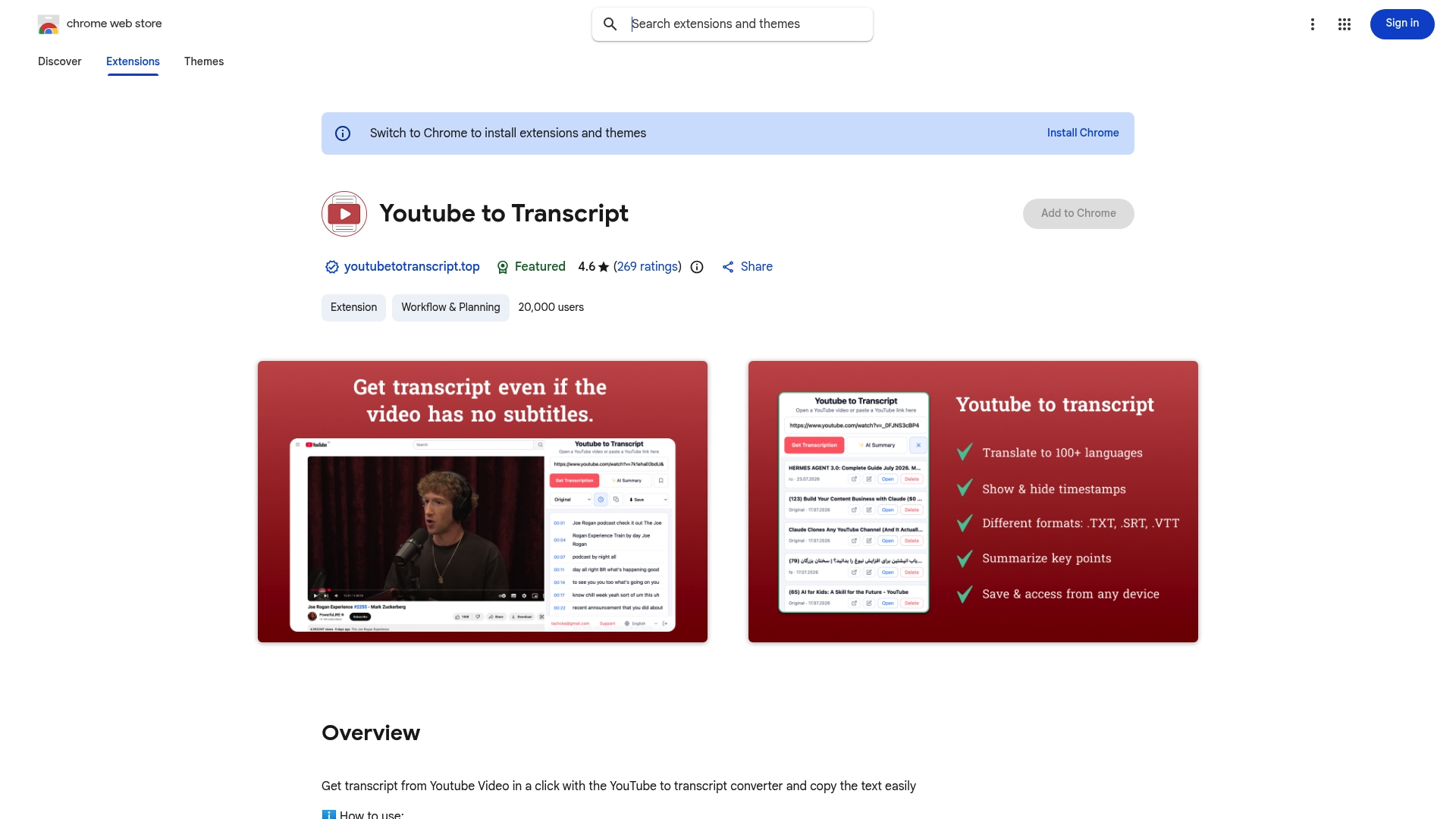
The free tier handles occasional needs with no card required. Upgrading unlocks batch processing across your full video library, expanded cloud storage, and unlimited translation into 89-plus languages, useful once you’re publishing on a schedule rather than one-off. Getting started takes three steps: install the browser extension, paste any YouTube URL, and download the transcript as TXT, SRT, or VTT. Creators scaling into automated pipelines might also look at developer-focused platforms like Baitless for API-based workflows layered on top. For most people transcribing their own channel, the extension alone covers the job. Try it on your next upload and compare the output against what a $60 human quote would have cost you.
Sources
- Transcription Costs in 2026: Your Ultimate Pricing Guide
- How Much Does Transcription Cost? 2026 Pricing Guide + Calculator | VexaScribe
- Pricing – Rev.com Help Center
- Transcription Rates & What Must Be Included in the Price – Verbit
FAQ
Is YouTube Transcription Free?
YouTube’s built-in auto-captions are free but often inaccurate with names, jargon, or accents. Free tiers on dedicated tools like Youtubetotranscript cover light use, while heavier volume typically requires a paid plan.
How Much Does Transcription Cost for a Standard YouTube Video?
A 60-minute video costs roughly $0.18 to $15 with AI transcription and $60 to $180 with human transcription, depending on the vendor and plan.
Can I Transcribe an Entire YouTube Video?
Yes. Tools like Youtubetotranscript extract full-length transcripts from a YouTube URL in one click, including videos that never had captions to begin with.
What Is the Cheapest Transcription Service?
Free AI tools and low-tier subscriptions are the cheapest options, often costing fractions of a cent per minute, though very short or occasional needs may not require a paid plan at all.